Enhance Your Web Design with Olliffia Font
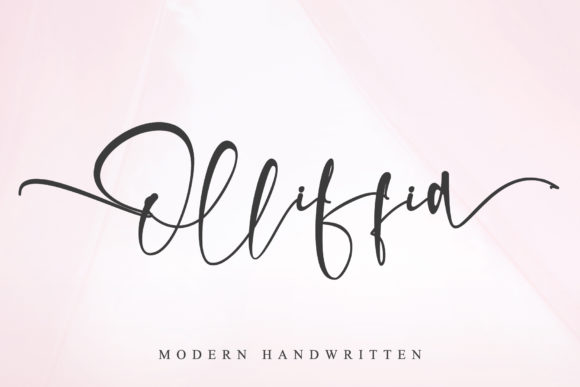
As a web designer, I recently had the opportunity to test Olliffia, a modern and sweet handwritten font, in a real website project. This font is not just visually appealing; it's also PUA encoded, allowing access to all its cute glyphs and swashes, making it a versatile choice for any digital layout.
A First Look at Olliffia in a Hero Section
I started by integrating Olliffia into the hero section of a boutique online store. The font's flowing, elegant style immediately caught the eye, setting a welcoming and sophisticated tone. The handwritten quality of Olliffia added a personal touch, making the brand feel more approachable and unique.
Visual Characteristics and Digital Appeal
Olliffia has a charming, almost whimsical personality that can elevate any design. Its smooth, connected letters and playful swashes make it an ideal choice for adding a touch of creativity and warmth. This typeface is perfect for brands that want to convey a friendly, yet professional image.
Using Olliffia for Different Web Elements
Beyond the hero section, I explored how Olliffia could be used in various parts of the website. For instance, in the header, Olliffia worked beautifully as a logo text, giving the brand a distinct and memorable look. In call-to-action areas, the font's bold and expressive nature made buttons and short phrases stand out, encouraging user engagement.
- Headers and Hero Sections: Use Olliffia for main titles to create a strong visual impact.
- Call-to-Action Areas: Apply the font to buttons and short phrases for emphasis.
- Logo Text: Leverage Olliffia’s unique style to craft a standout logo.
- Decorative Accents: Add subtle swashes and glyphs to enhance visual interest.
Readability and Responsive Design
One of the key considerations when using Olliffia is readability. While the font is highly decorative, it's essential to ensure it remains legible, especially on mobile screens. I found that using Olliffia for shorter text, such as headlines and subheadings, worked best. For longer body text, I paired it with a clean sans serif font, like Arial or Helvetica, to maintain clarity and readability.
Font Pairing and Brand Consistency
To create a balanced and cohesive design, I experimented with different font pairings. Combining Olliffia with a simple, geometric sans serif font provided a nice contrast, making the overall design more polished and professional. This combination was particularly effective for a coaching website, where the handwritten font added a personal touch, while the sans serif maintained a sense of professionalism and clarity.
Practical Tips for Using Olliffia
- Check Readability: Test Olliffia on different backgrounds and screen sizes to ensure it remains legible.
- Use for Short Text: Apply Olliffia for headlines, logos, and short phrases to maximize its decorative impact.
- Pair with Sans Serifs: Combine Olliffia with a clean sans serif font for body text to maintain readability and balance.
- Explore Alternates and Weights: Utilize the included styles and weights to add variety and depth to your designs.
- Verify Licensing: Ensure you have the appropriate commercial license before using Olliffia in client projects or online stores.
Conclusion
Incorporating Olliffia into my web design projects has been a delightful experience. This modern and sweet handwritten font not only adds a unique and personal touch but also enhances the overall visual appeal and user engagement. Whether you're designing a creative portfolio, a boutique online store, or a coaching website, Olliffia is a fantastic choice for creating a memorable and polished brand identity.